What an AI Football Analysis Actually Looks Like: Inside the Dashboard
Parents ask 'is this just a generic chatbot?' Here's exactly what lands on the page when you upload your child's clip - the strengths, the drills, the root causes, and the privacy line at the top. Walked through a section at a time.
Before you upload a video of your child to a website, you want to know one thing: is this actually going to tell me something I can't see myself, or is it a chatbot in a football skin?
Fair question. Most "AI coach" tools on the App Store are a chatbot wrapped in a kicking emoji. You paste a clip, it returns three paragraphs of generic encouragement, and you're A$15 poorer with nothing you'd repeat to your kid on the drive home. So let's skip the marketing and show you what actually comes back when you upload here.
Because the feedback here is not a chat reply. It's a structured coaching report - broken into named sections, with the same shape a real coach would hand you after a session. You don't read it; you work through it. Here's what's on the page, section by section, using a real analysis of a shooting clip (a kid who hit a penalty well over the bar) so you can picture your own child's version.
Before the feedback: the promise the page makes to you
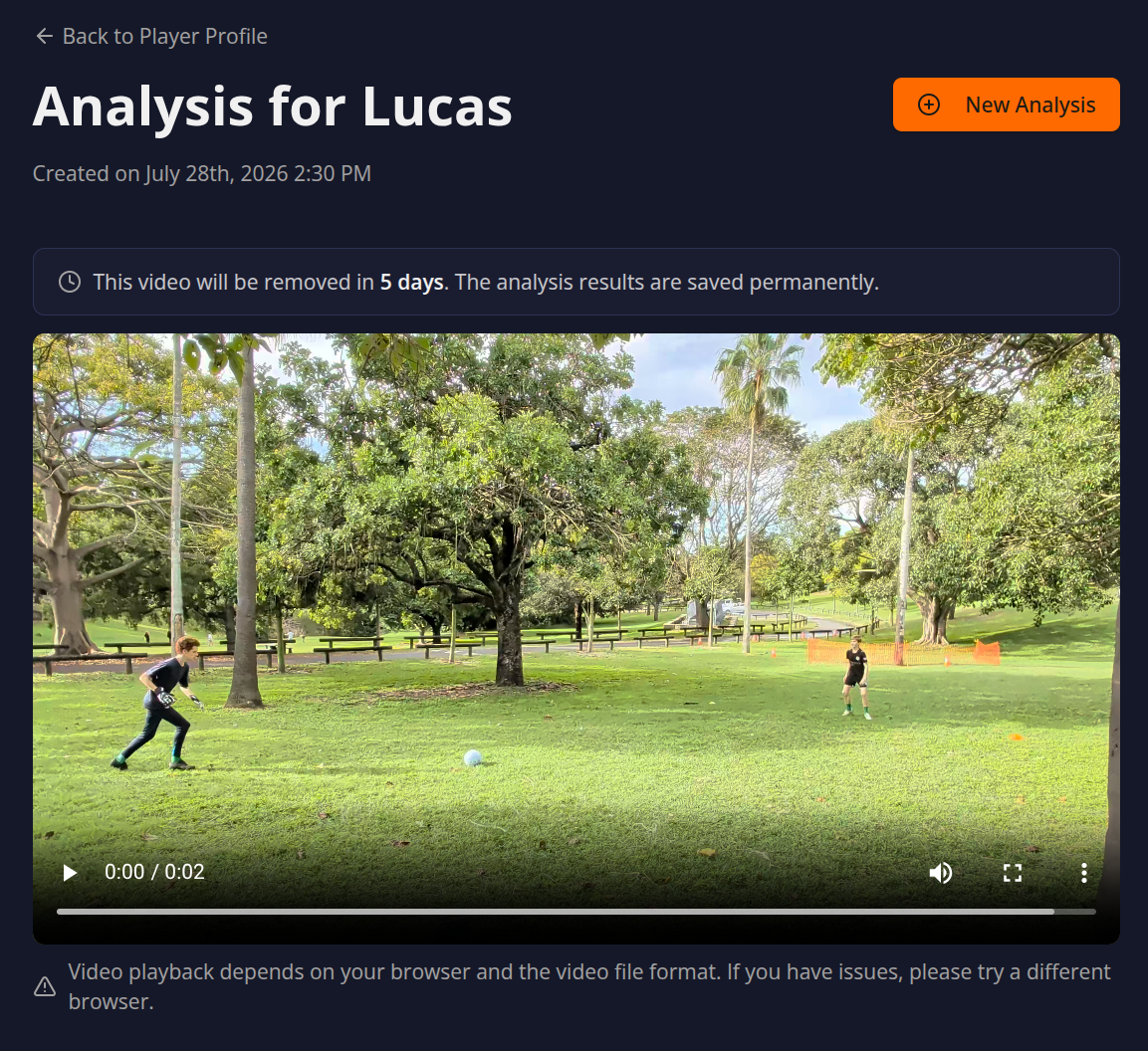
The very top of the analysis page isn't analysis. It's a line that tells you what's happening to your video.
You see the player's name and the date the analysis was created. Right underneath, there's a retention line that reads something like "This video will be removed in 5 days. The analysis results are saved permanently."
That line matters. It's the difference between "we have your child's video forever, somewhere" and "the clip is gone in five days; only the written feedback sticks around." If you're a parent who paused at the upload screen, that's the line that lets you breathe out. We'll come back to the privacy mechanics at the end.
Overall summary: the plain-English verdict
The first thing below the header is a short paragraph - the overall summary. No bullet points, no jargon. Just a plain-English read of what happened in the clip.
In the shooting example: "demonstrated good power in his penalty kick attempt, but the shot went significantly over the target. This single attempt highlights an area for improvement in striking accuracy."
Two sentences. It told the parent two things - power is good, placement is the problem - without needing them to know what "plant foot" or "knee-over-ball" means yet. That translation layer, from technical mechanics into a sentence a parent can repeat, is the entire point. A chatbot would have given you five paragraphs. This gives you the verdict.
Strengths analysis: the part parents skip (and shouldn't)
Here's where the structure does something most parents miss at first. Before it tells you what's wrong, it tells you what's already right - and calls it by name.
In the shooting example, the strength is Shot Power. It says the child "struck the ball with considerable power... indicating good leg strength and a solid contact point." Then it tells you why that matters: "This power is a valuable asset for scoring... makes them difficult for goalkeepers to save and increasing the potential for goals from various distances."
Parents almost always skim this section on their first analysis. They came looking for the fix. But the strengths section is the part you read to your child. The drill-it-drills-down feedback is for you, the parent-coach. The strengths line is the one that lands in the car on the way home: "Your power was genuinely good. That's the asset. Now we make it land in the corner."
If you take one thing from this article: read the strengths out loud to your kid, even when the analysis found three problems. They need to hear it.
Areas for improvement and drills: the real work
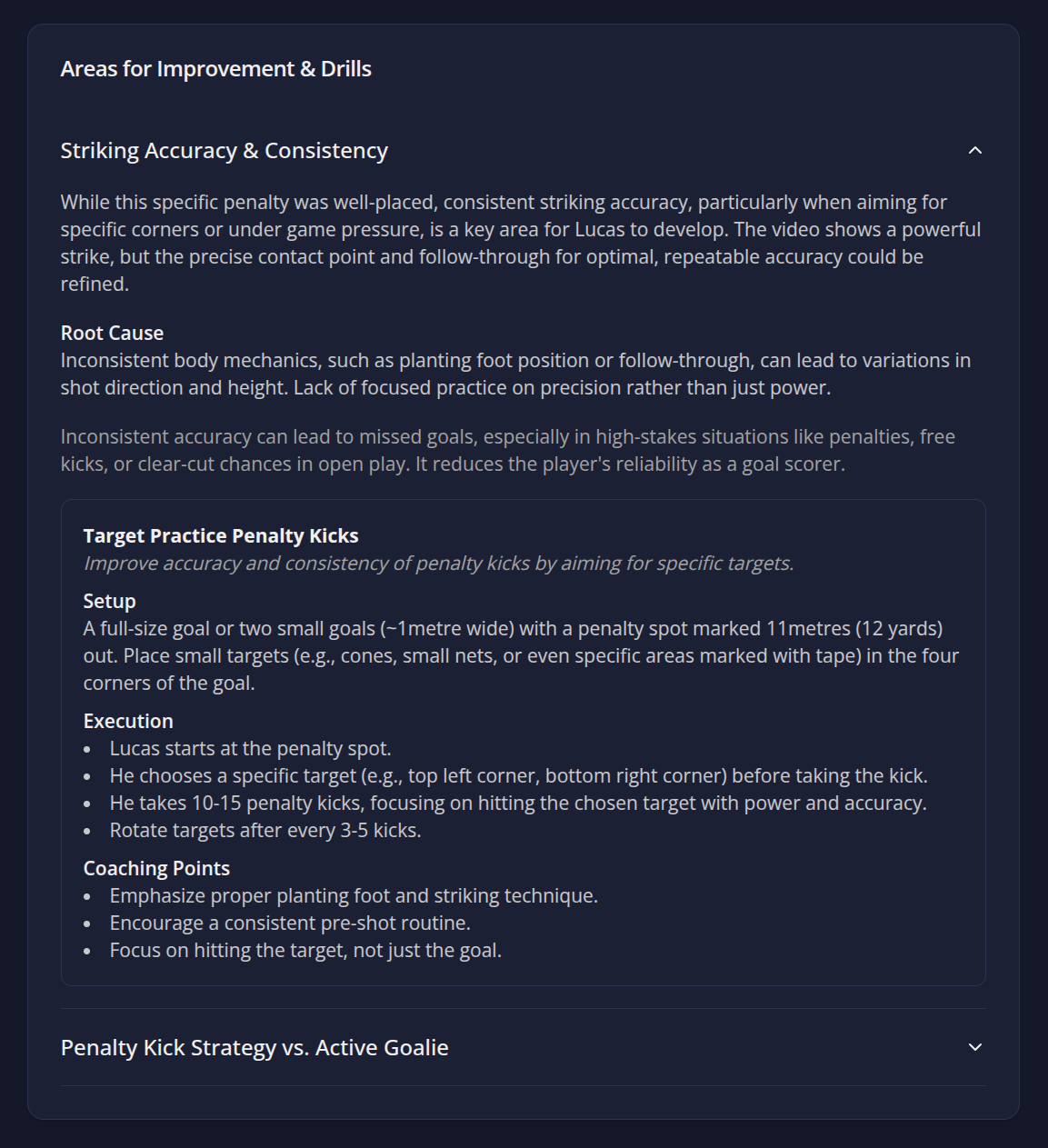
This is the section you came for. And it's not a single line - it's a nested structure that does three jobs: names the issue, finds the root cause, and prescribes a drill to fix it. There can be more than one.
In the shooting example, the area is Striking Accuracy (Penalty Kick). The structure goes:
The issue, plainly. "Despite the power, the penalty kick went significantly over the designated goal. This suggests a need to refine his striking technique for better control and placement." Note the timestamp [0:01-0:02] - the analysis points at the exact moment in the clip where it broke. You can scrub to it.
The root cause. This is the bit that separates an analysis from a chatbot. "Likely due to leaning back too much at the point of contact, causing the foot to strike under the ball rather than through its center, resulting in the ball rising excessively." That's a mechanical reason, in plain English, for why a powerful shot sailed over the bar. The parent now understands why - not just that it's wrong. That's the difference.
The drill. Then comes a named drill - in this case, Penalty Kick Placement Drill - laid out in the same format a grassroots session plan uses: Setup (cones 6-8 yards apart, penalty spot 12 yards out, targets in bottom corners and under the bar), Execution (10-15 kicks at named targets, vary after a few), and Coaching Points (plant foot beside the ball pointing at target, head down, strike through the centre with laces, follow through, land on the kicking foot).
A clip often surfaces more than one area for improvement. You might get a striking drill and a body-shape drill from the same upload. Each one comes with its own root cause and its own drill. You don't have to fix everything in one session - pick the root cause that matches what you saw on Saturday and run that drill this week.
Tactical and mental insights: the bit a coach adds
Below the drills, there's a section that does what most AI tools don't bother with: it reads the decision around the technique, not just the technique itself.
In the example: "Given the 'goalie' was standing directly in the middle of the goal, a more composed approach might have involved placing the ball to either side rather than relying solely on power to beat the keeper."
That's not a mechanics note - it's a game-intelligence note. It comes with a recommendation: "Before approaching the ball, take a moment to scan the goalkeeper's position and visualize the exact spot in the goal you intend to hit. Prioritize placement and technique over maximum power, especially when the keeper is static."
This is the section that answers the "is this just a chatbot" question most directly. A chatbot trained on football text can describe a shot. It takes an actual reading of your child's clip - and the context around it - to say "the keeper was stood in the middle, so your kid should have gone round them, not over them."
Metrics to track: how you know it's working
Then comes a short list of metrics. For the shooting example: penalty kick accuracy (shots on target / total), success rate (goals / total), and consistency of striking technique via video.
You're not a data scientist. You don't need to build a spreadsheet. But this list is the bridge between "we did a drill" and "it actually changed something." Film the same technique in two weeks, upload again, and these are the numbers that move. Without that re-upload, the drill is just practice. With it, you've got a feedback loop - and a feedback loop is what actually develops a player.
Next steps: the one-paragraph action
The page ends with a short "Next Steps" block written to the player, in a coach's voice. In the example: "you've got fantastic power in your shot... focus on the 'Penalty Kick Placement Drill.' Pay close attention to keeping your body over the ball and following through towards your target."
It's the bit your child reads - or that you read to them. One drill named, one focus for the week, no overwhelm. If the analysis gave you two drills, this section tells you which one to start with.
The privacy line, revisited
You uploaded a video of your child. Here's what happens to it.
The clip is sent to the analysis engine - Google Gemini, the same frontier model used in enterprise-grade tools - to read the body mechanics. It is not used to train AI. It is not shared. It is not sold. And it auto-deletes after five days - that's the retention line you saw at the top of the page, not a setting you have to find.
The written feedback - the strengths, the root causes, the drills, the metrics - stays in your profile permanently, so you can come back to it. If you want the video gone sooner than five days, there's a one-click delete. No support ticket, no email chase.
This is the part a lot of "AI coach" apps gloss over. It's also the part parents ask about most. So: the video leaves your phone, gets read, and is gone in under a week. The coaching report it produced is what you keep.
Is this just a generic chatbot?
No. Here's the test: a generic chatbot, asked about a penalty that went over the bar, would tell you to "keep your head down and follow through." That's true of every missed penalty in history. It's a template.
What lands on the dashboard here tells you this clip's plant foot was too far behind the ball, this striker leaned back at contact, and this keeper was central so placement beat power. It then gives you a drill with cones 6-8 yards apart and 15 reps at named targets. None of that is generic. All of it required actually reading the frames you uploaded.
If you want to see your child's version: film a ten-second clip of one technique, upload it, and read the page that comes back. The first analysis is free - no credit card, no app to install, no subscription to cancel. You'll get the strengths, the root cause, a drill or two, and the one thing to work on this week. If that's not what shows up, you've lost ninety seconds and nothing else.
Ready to see your child's analysis? Upload a short clip for a free first analysis - built by a parent at a community football club, powered by Google Gemini, and your video is never used to train AI and can be deleted with one click.